

Wednesday, May 23, 2012
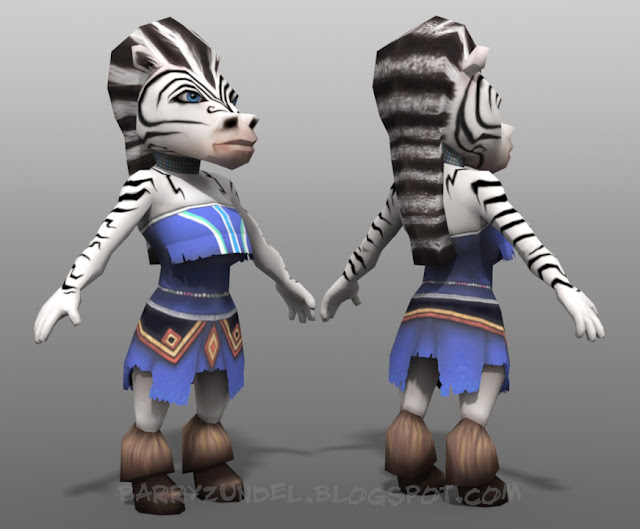
1500 Tris
I did this model for a freelance project. The client ended up not needing it, so I thought I would post it. I modeled it in 3DS Max and Modo, and textured it in Photoshop.


Wednesday, March 21, 2012
Co-Worker Vampire Hunters
Just a sketch from work where we caricature-ize each other according to a certain topic. Fun stuff!


Thursday, March 15, 2012
Sculptris to ZBrush....Not a fan.

 |
| The Sculptris mesh in ZBrush |
 |
| This is what happens when you subdivide the model up...not pretty. |
Tuesday, March 13, 2012
New Sculptris Head
So I'm continuing exploring what I want the head to look like for my new personal project. This was done in Sculptris. I'm really liking it for roughing out a character and getting the shapes quickly, but it leaves a lot to be desired with the artifacting that happens when you subdivide the model. I need Dynamesh for that! Hopefully soon! But I opened this in Modo and did some retopology on it and it was looking great. I'm liking the new process that I'm coming up with.


Wednesday, February 22, 2012
Blender 2.62 Remesh Test
ZBrush 4.2 is getting a lot of attention with the new Dynamesh, and I think it is absolutely awesome for an artistic workflow. However, when I saw that Blender implemented the same thing, I wanted to see how it worked. I was pleasantly surprised :) The tools for sculpting have come a LONG way since they were first adopted, and so I gave it a shot...and I had to use my mouse! (Linux dropped my wacom support, and I didn't want to restart.) Here's how it turned out starting from a sphere, rendered in Cycles, after about 15 minutes:


It's not anatomically perfect, but I'll try it again with a tablet next time. It's still not ZBrush, but for a FREE tool, it's really a great weapon to have in my arsenal.
Thursday, January 26, 2012
TOES!
Spent an hour or so modeling the toes tonight. I once saw a news story about how a man lost his thumb in a shop accident, so they sewed a cadaver's big toe onto his hand, and it works perfectly. Well, I just took a finger and made a toe out of it. Seemed to work just fine too. :) Now to just attach them to the feet. I'm getting REALLY tired of how many times I have to click in Max. Talk about carpel tunnel.


Tuesday, January 24, 2012
Attached Hands...
And now on to the the feet! After a brief respite from the 1am nights, I got the hands modeled and attached to the body. Max is proving to be pretty good for modeling, if I could just find a tool to "tweak" the verts. That, and I find that the brushes aren't very good at getting what I want. Normally at this point, I would export it to Modo or Silo for refining, but I'm going to stick it out. Hopefully soon I'll be starting the head. About 6 hours in total at this point.


Tuesday, January 17, 2012
Hand Modeling Timelapse Parts 2, 3
Here are parts 2 and 3. There are still some points where I am trying to find the right tool, but again, feeling like I'm getting really comfortable...
Sunday, January 15, 2012
Hand Modeling Timelapse
Here's the video I promised in the previous post. It's unedited and fraught with mistakes, and keep in mind that I'm still learning 3DS Max :) There's no sounds and it's 2x real speed.
3DS Max Rambling and Wicked Fingers
So, like I said before, I'm learning 3DS Max. Yeah. Who knew that I could be in the game and film industry as a character TD for 11 years and have never used it in production? Well, it's the truth. I have to say it is different, but I'm liking the tools. It's going to take more getting used to than I anticipated, mainly because of a couple of things: navigation that is NOT like Maya, Modo, Silo, or others; and how CTRL clicking is how you add to selections, NOT with Shift. C'mon, really? Every app on the planet uses SHIFT to add to a selection. Oh well, it's a little thing. It just slows me down a bit but nothing big. I'm finding that I'm mainly using the same 4 tools: extrude, bridge, insert edge loop, and "Set Flow". Not sure why it is called that, but okay. There's a little thing I like to call "Click Rate" for every application, where in order to perform a command or function, how many clicks does it take? For example, to bevel and edge:
So far, 3DS Max is pretty high on the click-rate scale (that's a bad thing). I think this is what most 3d Software suffers from. There are ways to do better, and I haven't seen many of the mainstream apps do it very well. I've been using Silo lately (wish they would continue developing it) and I really love the modeling tools, and how simple yet powerful they are. They really got it right when they wrote that.
Anyways, I couldn't help but hear the soundtrack to "Wicked" playing while I modeled these :) 3DS Max modeling is getting a lot more comfortable...now I really need to learn the hotkeys to speed my workflow up, but I am feeling like I'm getting the hang of it. This was about an hour of work. I'll be redoing the nails so that they look correct, but for now, I think things are looking pretty good. I did a timelapse video of this process, and maybe I'll post it soon. Stay tuned!

- Select the edge
- Open the edge menu
- Select the bevel tool
- Click and drag on the edge
- Fit the new edges into place
- Hit a hotkey (ex: hit the B key)
- Click and drag on an edge (or hold Shift while dragging for the entire loop) to bevel it out, and the bevel either interpolates the shape (cubic) or follows the edge directly (linear) according to your tool settings.
So far, 3DS Max is pretty high on the click-rate scale (that's a bad thing). I think this is what most 3d Software suffers from. There are ways to do better, and I haven't seen many of the mainstream apps do it very well. I've been using Silo lately (wish they would continue developing it) and I really love the modeling tools, and how simple yet powerful they are. They really got it right when they wrote that.
Anyways, I couldn't help but hear the soundtrack to "Wicked" playing while I modeled these :) 3DS Max modeling is getting a lot more comfortable...now I really need to learn the hotkeys to speed my workflow up, but I am feeling like I'm getting the hang of it. This was about an hour of work. I'll be redoing the nails so that they look correct, but for now, I think things are looking pretty good. I did a timelapse video of this process, and maybe I'll post it soon. Stay tuned!

Thursday, January 05, 2012
Time to Learn Max
Well, I've decided that I need to learn 3DS Max. I guess it's a good thing since most of the CG world uses it :) Anyways, I've given it a shot, starting my character for my new project in it. So far, it's very different than Maya, Modo, or Silo, but I'm liking a lot of the tools in it. It's coming along quicker than I thought. Now I just have to keep at it. Here's a quick shot of my current progress, after a couple of hours (yes, I am LEARNING it...normally that wouldn't take me more than 30 minutes).


Tuesday, January 03, 2012
Sea Tel Christmas Card
This was a quick animation I did for a client. It took about a week to do, and is all done in Maya and Photoshop. The sound was done by the great Ethan Halvorsen. I think it turned out pretty well.
Wednesday, November 16, 2011
I guess I like old guys' faces....
A little fun in Sculptris (20 min)


The simplicity of Sculptris is awesome. To just get an idea out there, and then take it into 3D Coat to retopo is a really slick pipeline. Maybe I'll do a video of it soon. For now, I think I need to branch off into something other than wrinkly, angry old men.
Wednesday, November 02, 2011
Petrie Dish
I don't know if that's how you spell it, but we are playing "round robin" with colds at my house, and it's my turn....again. I'm going to bed.


Tuesday, November 01, 2011
A:M Tutorials Back Online!!
I've been getting a lot of emails lately about my Lulu.com video site. Lulu discontinued the ability to sell digital downloads, so I have to find a new automated method. But for now, you can go to my website and purchase them directly from there. This is not an ideal method, but it's through PayPal, and you don't have to have a Lulu account to purchase them. So if you are looking for my tutorials, head on over...they are available again.
Once I get payment confirmation, I'll send you an email with the links to download the videos from my server. I'll get you the email within 24 hours, most of the time it will be a matter of minutes. All you need to do is Right-Click and Save As, and it will download the file for you. If you have any questions, don't hesitate to respond here, or email me.
Thanks!
Barry
Once I get payment confirmation, I'll send you an email with the links to download the videos from my server. I'll get you the email within 24 hours, most of the time it will be a matter of minutes. All you need to do is Right-Click and Save As, and it will download the file for you. If you have any questions, don't hesitate to respond here, or email me.
Thanks!
Barry
Tuesday, October 25, 2011
Bee-Hive Update and Bee-Hive Lite now available!
Our awesome game - "Bee-Hive" has been updated to v 1.1! Included are new tutorials, new sound effects, new music, and some new graphics. It's available for Android, iOS, and WebOS! There's also a new Bee-Hive Lite (Free) version (on Android, soon on iOS) for you to try before you buy! Go give it a shot and tell me what you think!

Thursday, October 20, 2011


Monday, October 17, 2011
New Personal Project
Well, it's time to push myself...again. Time to learn to do things that I can definitely improve on, so I'm starting a new personal project. This project is going to be a 30 second short, fully written, designed, modeled, textured, rigged, animated, and rendered by yours truly. I've already started on the first parts, where I've written the script and designed the first character (there's only two). One of my pet projects wherever I am is to try to optimize the pipeline so that it is as fast as possible, while allowing me more time to focus on the ART of the project rather than the technical aspects of the project. While I like the technical stuff, the further I get in my career, the more I realize that I am constantly going back to my first love - the art. I am trying to have a timeline for this project, and hope that I can stick to it with how insanely crazy my life is. Thankfully, this project has the full backing (and pushing forward) of my wife. So we will see how the next 6 months goes. I plan to post all of the progress on another blog, where you can follow along with this crazy journey. Here is a sample of one of the designs. Hope you like it (the face is still in design review for me :) )


Saturday, October 08, 2011

New iPad Drawing
I'm starting to get used to drawing on the iPad. However, I still feel that the stylus tip is way too fat for my liking. But maybe that's a good thing. It keeps me from noodling a drawing to death like I usually do. 
Thursday, September 29, 2011
Retopologizing in 3D Coat = AWESOME.
Been SUPER busy lately, but I decided to take my Arnold Sculpt into 3D coat and retopo it. Man, 3D Coat blows away other software when it comes to retopologizing. So easy, so intuitive, so powerful. That's how software should be. It took me about 30 minutes to get this far... and that's with a learning curve! This is totally IP, but so far, there's only 4 tris. Can you find them?


Friday, September 16, 2011

Thursday, September 15, 2011
Such a Decieving Thumbnail...or is it my brain?
It's funny how you can see the thumbnail of an image, imagine the full image to look one way, or see something in it, and then look at the full image, only to realize that you were completely wrong. I just did this. I was strolling through Blizzard's website, and saw an image thumbnail and saw this:

In the quick glance, my brain saw this:

But in reality, it was this:

In the quick glance, my brain saw this:
But in reality, it was this:

I wish my brain worked like that all the time :)
Friday, September 09, 2011
40 Minute Mudbox Sketch
At work, we had a little challenge, just to get the creativity flowing. We had 40 minutes to sculpt Arnold Schwarzenegger. Here's my attempt. I think I was headed on the right track. I wanted it a bit more stylized, but it came out a little more realistic than I wanted. Oh well, it's a long way from done, but it was really fun to do.
Thursday, September 08, 2011
Where the heck have I been?
Wow, it's been a while since I last posted. And what about that "daily drawing" you may ask? Yeah, what about that. Ha ha. Funny how life seems to accelerate into a giant blur.
Most of that time has been spent working on other projects - one of which has finally been finished (at least for now): a new game for iOS, Android, and WebOS called Bee-Hive! It's a combination of a puzzle with traffic control, and it's a blast to play! Head on over to the App Store, the Android Market, or to the WebOS store and pick it up now! Make sure to rate it and also leave a review for us! You can also follow Bee-Hive on our Facebook Page. Leave comments there, look for hints, and like us!
iOS
Android
WebOS (link coming soon!)


Most of that time has been spent working on other projects - one of which has finally been finished (at least for now): a new game for iOS, Android, and WebOS called Bee-Hive! It's a combination of a puzzle with traffic control, and it's a blast to play! Head on over to the App Store, the Android Market, or to the WebOS store and pick it up now! Make sure to rate it and also leave a review for us! You can also follow Bee-Hive on our Facebook Page. Leave comments there, look for hints, and like us!
iOS
Android
WebOS (link coming soon!)
Subscribe to:
Comments (Atom)