
Friday, May 08, 2015
A:M 2005 Training Now Free!
Come and get it! Go to the "Training" tab at the top of the page and you can find it all there!


Thursday, August 21, 2014
My Last Pixar Model
Well, after working on "The Good Dinosaur" for the better part of a year, I spent the last month or so working on a toy for "Toy Story of Terror" called "Forklift Sal". She was a little plastic forklift that helps the toys trying to escape from the cabinet.

Last Halloween when "Toy Story of Terror" was released, I totally missed the premier on TV, thought I DVR'd it, and then realized I didn't get it. So I didn't even get to see it. So I never knew what became of Forklift Sal until now. The DVD/Blu Ray is now available here. Thar she blows in all her glory! So I go check IMDB to see if I'm listed and.... I got left off the credits. Seriously? Man. Oh well. I'll post a wireframe of the model sometime. Enjoy the featurette!
Last Halloween when "Toy Story of Terror" was released, I totally missed the premier on TV, thought I DVR'd it, and then realized I didn't get it. So I didn't even get to see it. So I never knew what became of Forklift Sal until now. The DVD/Blu Ray is now available here. Thar she blows in all her glory! So I go check IMDB to see if I'm listed and.... I got left off the credits. Seriously? Man. Oh well. I'll post a wireframe of the model sometime. Enjoy the featurette!
Thursday, August 07, 2014
Real-Time Awesomeness!
So lately I have been doing a lot of exploring in Unreal 4. I've really got the bug to get back into real-time technologies in the past year. I miss the instant feedback and the interactive way that you can play with your ideas. It's so freeing to see exactly what you are going to get and not have to wait for a render to kick off. I've spent countless hours sitting at a screen waiting for something to show up, and even with modern renderers (I use Modo almost exclusively), I still want more fluid interaction.
Real-time rendering has gone through a true renaissance. What you are able to get now in Unreal Engine 4, Crytek's CryEngine, Unity 5, Marmoset Toolbag, and others is absolutely stunning. It's only getting better too. That is what is so exciting. Computing power is only getting better and faster, especially when it comes to graphics. I still watch Epic's Unreal Engine 4 demo "Elemental" and I am blown away.
The fact that it renders in real-time (I've dissected the level for myself) is absolutely crazy. It opens up a whole new method of storytelling - the ability to see your story evolve in front of you. Make changes and see them immediately. Sorry, I'm geeking out. But in my career, I've spent so much time waiting to see what I was trying to create, it really makes me get excited.
I'm going to start sharing some tips for Unreal Engine 4 as I discover ways of creating my vision. One way that Unreal has really changed my outlook is through "Blueprints", or Unreal's visual scripting language. I barely started using UDK, and never really got into Kismet, but Blueprints have opened up a whole new world to me. No matter how hard I have tried, how many hours of tutorials I have watched, I have always struggled with programming. It's so powerful. But I'm just too dang impatient. Blueprints changes that for me. I can quickly try things in a flow that (mostly) makes sense to me.
For one test I'm working on, I wanted to figure out how to use a key command to switch materials on an object. I saw a post on a forum where that ability was scripted in C++. I lost interest after the first couple lines. I searched on the Unreal forums, and found a few breadcrumbs, but in the end, I discovered that a couple of breadcrumbs put together created a pretty sweet loaf. It was fairly simple, once I knew how to create changes from multiple keystrokes...the MultiGate node! Here's what it looks like:

Real-time rendering has gone through a true renaissance. What you are able to get now in Unreal Engine 4, Crytek's CryEngine, Unity 5, Marmoset Toolbag, and others is absolutely stunning. It's only getting better too. That is what is so exciting. Computing power is only getting better and faster, especially when it comes to graphics. I still watch Epic's Unreal Engine 4 demo "Elemental" and I am blown away.
The fact that it renders in real-time (I've dissected the level for myself) is absolutely crazy. It opens up a whole new method of storytelling - the ability to see your story evolve in front of you. Make changes and see them immediately. Sorry, I'm geeking out. But in my career, I've spent so much time waiting to see what I was trying to create, it really makes me get excited.
I'm going to start sharing some tips for Unreal Engine 4 as I discover ways of creating my vision. One way that Unreal has really changed my outlook is through "Blueprints", or Unreal's visual scripting language. I barely started using UDK, and never really got into Kismet, but Blueprints have opened up a whole new world to me. No matter how hard I have tried, how many hours of tutorials I have watched, I have always struggled with programming. It's so powerful. But I'm just too dang impatient. Blueprints changes that for me. I can quickly try things in a flow that (mostly) makes sense to me.
For one test I'm working on, I wanted to figure out how to use a key command to switch materials on an object. I saw a post on a forum where that ability was scripted in C++. I lost interest after the first couple lines. I searched on the Unreal forums, and found a few breadcrumbs, but in the end, I discovered that a couple of breadcrumbs put together created a pretty sweet loaf. It was fairly simple, once I knew how to create changes from multiple keystrokes...the MultiGate node! Here's what it looks like:
After that, I can now change the material of an object with a keystroke, controller button, or any other input. Blueprints are pretty addicting, so I'm sure that I'll be posting even more about them soon. I'm not an expert, but if I can do it, anyone can :) Stay tuned for screen shots and some experiments!
Wednesday, June 04, 2014
Previz | Pixar's Presto demonstration at Nvidia's GTC conference 2014
This is truly awesome stuff. So much being processed in real-time. This was just getting going when I was at Pixar. So cool to see it really coming together in such a powerful manner. The technology is getting faster and better. Soon we'll have full shaders running in real-time in the 3D viewers (like they already are in most game engines.)
Sunday, January 19, 2014
Modo 701 Training - Corrective Shoulder Morphs
I've been trying to nail down a good corrective morph workflow lately and here is where I am at. My previous video about corrective morphs with an elbow generated a few questions about multi-axis and multi-joint corrective morphs.
The key is this: get your weighting correct first. If you try to sculpt on top of bad weighting, you will be fighting it constantly. Get as far as you can with weighting, and then go on to sculpting. Hope this helps!
The key is this: get your weighting correct first. If you try to sculpt on top of bad weighting, you will be fighting it constantly. Get as far as you can with weighting, and then go on to sculpting. Hope this helps!
Monday, January 06, 2014
MyPaint Test
So I decided to play around with MyPaint. Doesn't look like it's in any recent development, but for an open source, it's pretty impressive...

With the right brushes, it feels a lot like Painter, with brushes that bleed and smudge. I'm going to have to finish a painting with it to really put it through its paces. Stay tuned.
With the right brushes, it feels a lot like Painter, with brushes that bleed and smudge. I'm going to have to finish a painting with it to really put it through its paces. Stay tuned.
Tuesday, December 03, 2013
Sketchin'
No reference (that's a bad habit). Just getting back to sketching on my Cintiq. Didn't have paper and a good pencil today.

Sunday, December 01, 2013
Glen Keane Dance Animation Tutorial
The master at work. Glad I was able to meet him and have a one on one chat for a few minutes. Wish it would have been days. Still trying to learn everything I can from him.
Friday, November 29, 2013
A Passion Reawakened

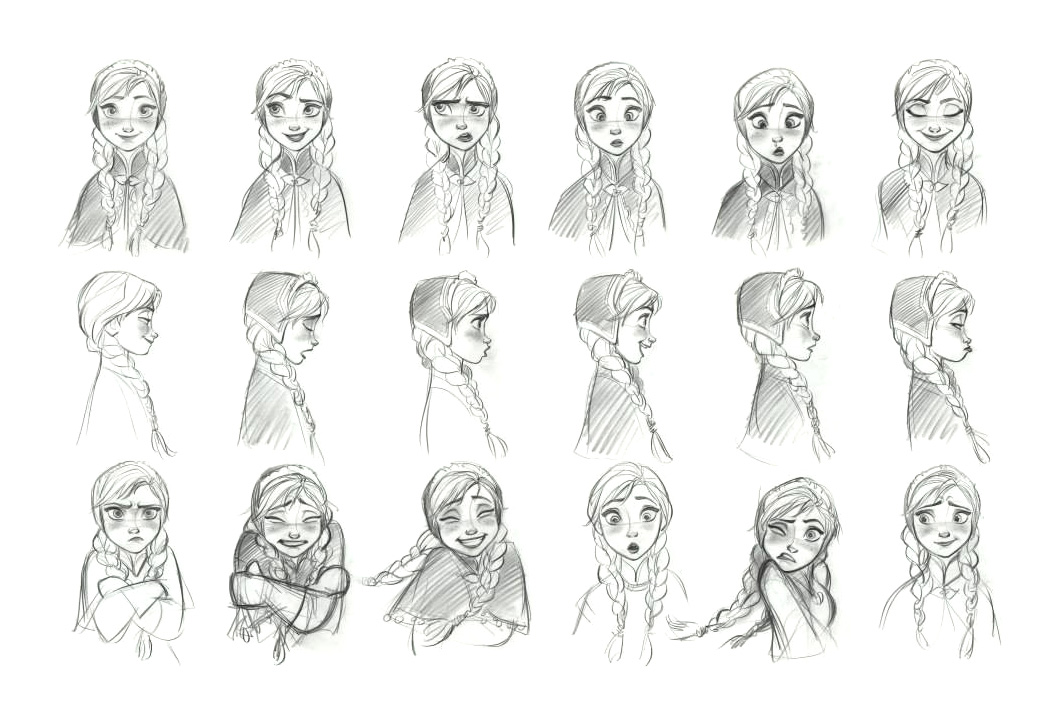
Just went and saw Disney's Frozen tonight with the family. Even through wrestling an 8 month old and standing in the aisle, I was blown away. Disney animation is truly hitting what I would like to call a "renaissance" of modern animation, and I am so excited about it.
When I was at Pixar, I had the chance to meet with many of the Disney team after Tangled had come out, and they put on quite an amazing demo of their work. It was incredible to see their workflow, their passion, and their desire to not just make another CG film, but to really push the limits, questioning everything, and truly becoming the artistic powerhouse that they had been so many years ago. It was inspiring. It was enthralling. It made me want to sculpt, to draw, to paint, to animate, and to (strangely enough) rig.

Watching the characters come to life is so inspiring. I know how much effort it takes to pull that off, but I am also amazed at how they really have tried to make it about the character - the effects, the world, the objects, while amazing in their own right, still take the back seat to the characters. That is what draws me to characters so much - the raw emotion and feeling that can come straight through them.

Monday, November 04, 2013
Modo Corrective Morphs
So I thought I would do a quick tutorial showing how to create a corrective morph in Modo 701. I couldn't really find any out there that described the simple steps that I wanted, so I thought I would create one on my own. Corrective morphs are something that CG has made WAY TOO HARD AND CONFUSING. For example, in one program, you have to duplicate your entire mesh and then sculpt that mesh in the static base pose to the shape it needs for your end result in the final pose...huh? Man, that's an unintuitive and backwards workflow if I have ever seen one. Totally bloated file in the end with hundreds of extra meshes. Now, there are some plugins that do a decent job, but the UI doesn't help make it easier, just gives you a different way to get frustrated.
I've said this before, and I'll say it again, but Hash's Animation:Master had it right. Some may say it's a garage hacker's toy, and that it's just a hobbyist's tool/ Yet it KILLS the competition when it comes to workflow for this (I hope the Modo guys pick it up before anyone else does!). So simple:
Anyways, here's the Modo demonstration. The tools are great, but the workflow has got to be adjusted. There's just no way that you can do this for 3 axes per joint on all the joints of the body. If the Luxology guys can get this down, I know of a lot of people who would switch in a heartbeat (hint hint).
If you have any questions, let me know!
I've said this before, and I'll say it again, but Hash's Animation:Master had it right. Some may say it's a garage hacker's toy, and that it's just a hobbyist's tool/ Yet it KILLS the competition when it comes to workflow for this (I hope the Modo guys pick it up before anyone else does!). So simple:
- Right-Click on a joint
- New>SmartSkin
- Select the axis of rotation
- Sculpt
Anyways, here's the Modo demonstration. The tools are great, but the workflow has got to be adjusted. There's just no way that you can do this for 3 axes per joint on all the joints of the body. If the Luxology guys can get this down, I know of a lot of people who would switch in a heartbeat (hint hint).
If you have any questions, let me know!
Wednesday, October 23, 2013
Workflow, Workflow, Workflow. It's all about the workflow.
I've been spending a lot of time at work with a certain software vendor trying to help me do some rigging using their tools. They have been a big help in getting me the result that I need, but not necessarily the way that I want. During this time, we had a lot of discussion about rigging workflow and one thing that he said to me was very telling. He said, "It seems like rigging is an antiquated method that started bad and has never been truly solved." We talked about almost every package, and the pros and cons of each, and how there aren't any solutions out there (other than proprietary methods) that really make rigging a natural process. We tried using almost every method of skinning. None were giving us a good result to start from. Some were better than others. But each was going to need hours of corrective shaping just to get reasonably good deformation that didn't look like rubber hoses and candy wrappers.
When I was a Disney Interactive, we had written an in-house tool that used a heat-diffusion algorithm and did an amazing job getting us 80-90% there. It didn't bleed from one finger to the other, or from the inside of one thigh to the other. It understood topology, and although it wasn't perfect, it removed the need to do most of our weight painting, and it was a push button solution.
At Pixar, we didnt' have any automatic weighting tools, so we had to populate weights by hand (before I left, we were developing some projection methods that would transfer weighting from a lo-res to a high-res mesh and did an amazing job). But weights were split into different axes, so you could weight XYZ, or each axis individually, and they blended very nicely. Then you could do corrective sculpting that worked amazingly well, although a bit tedious (I'm sure a year now after I have left, they have those tools dialed in really tight!). But the workflow was pretty straight forward, and quite artist-friendly. The workflow wasn't perfect, but it was getting there.
Way to look like you're working, Lou ;) (Lou is a rigging, modeling, animating, and modeling GENIUS.)
Now to today. Man, I wish I was back in Presto! But alas, I am not, and have been resigned to off-the-shelf solutions. :(
What's so interesting to me in software is that everyone talks about feature sets. They all talk about what they can do. They talk about the depth of their tools. They talk about how powerful their toolset is. Yet they never mention one thing...HOW to do it. I think this is for a very good reason...they know it's not a selling point. Go into Maya and try to create a corrective blend shape for a joint. Go ahead. Try it. Vanilla Maya. Yes, you CAN do it. But how much pain and anguish was it to create it? Okay, get a plugin, and try it now:
It may have a nice new window. But it still lacks simplicity, and is still hampered by the inherent limitations of the software. I still have to duplicate a mesh, pose it, create an offset mesh, sculpt that mesh, and then hook it back up as a blend shape that is set with a driven key. This is how most 3D software works. It really is quite pitiful. No fault of the developers of the plugin. They have to work within the bounds that they were given, and most software boxes are pitifully limited, or give such tight constraints that coming up with a more elegant solution usually means scripting your way through the tough parts (not bypassing them altogether).
Disney seems to finally have come up with a good, artist-friendly solution that is fast and easy to use (I'll have to verify that with friends that work there). But it is a volumetric solution that is fast and apparently automatic (I'm sure it's not quite THAT easy. But when they say that their goal is to make it super fast AND physically accurate, I'm sure ease of use is definitely a goal of theirs).
This is a perfect example of writing function into tools that otherwise would not allow for this approach. This is a proprietary addition to Maya, but it sure would be nice to have a system like this native. Things like this need to be standardized in rigging workflows.
I'm a big Modo user. I'm not a fan boy - I actually feel like it gives me better results faster, and is growing its tech base very quickly. Their rigging tools are coming along nicely, and I hope that soon, there will be a rigging "round 2" for a future release of Modo. I can see huge potential in their rigging system. My good friend, Rich Hurrey (a Pixar rigging TD), has done an extensive rigging training series and is working on the next iteration. Rich is a genius when it comes to rigging, and knowing that he's using Modo gives me confidence that I'm not the only one who thinks it has amazing potential. Can't wait to see it!
In the end, I think I'll just continue looking and hoping that some software vendor "gets it", and realizes that feature sets are one thing, but the ability for an artist to create what they want with ease will sell more copies of their software than any other factor there is. Make a powerful, feature-rich system with a slick and easy to use workflow, and you will own the industry.
When I was a Disney Interactive, we had written an in-house tool that used a heat-diffusion algorithm and did an amazing job getting us 80-90% there. It didn't bleed from one finger to the other, or from the inside of one thigh to the other. It understood topology, and although it wasn't perfect, it removed the need to do most of our weight painting, and it was a push button solution.
At Pixar, we didnt' have any automatic weighting tools, so we had to populate weights by hand (before I left, we were developing some projection methods that would transfer weighting from a lo-res to a high-res mesh and did an amazing job). But weights were split into different axes, so you could weight XYZ, or each axis individually, and they blended very nicely. Then you could do corrective sculpting that worked amazingly well, although a bit tedious (I'm sure a year now after I have left, they have those tools dialed in really tight!). But the workflow was pretty straight forward, and quite artist-friendly. The workflow wasn't perfect, but it was getting there.
Way to look like you're working, Lou ;) (Lou is a rigging, modeling, animating, and modeling GENIUS.)
Now to today. Man, I wish I was back in Presto! But alas, I am not, and have been resigned to off-the-shelf solutions. :(
What's so interesting to me in software is that everyone talks about feature sets. They all talk about what they can do. They talk about the depth of their tools. They talk about how powerful their toolset is. Yet they never mention one thing...HOW to do it. I think this is for a very good reason...they know it's not a selling point. Go into Maya and try to create a corrective blend shape for a joint. Go ahead. Try it. Vanilla Maya. Yes, you CAN do it. But how much pain and anguish was it to create it? Okay, get a plugin, and try it now:
It may have a nice new window. But it still lacks simplicity, and is still hampered by the inherent limitations of the software. I still have to duplicate a mesh, pose it, create an offset mesh, sculpt that mesh, and then hook it back up as a blend shape that is set with a driven key. This is how most 3D software works. It really is quite pitiful. No fault of the developers of the plugin. They have to work within the bounds that they were given, and most software boxes are pitifully limited, or give such tight constraints that coming up with a more elegant solution usually means scripting your way through the tough parts (not bypassing them altogether).
Disney seems to finally have come up with a good, artist-friendly solution that is fast and easy to use (I'll have to verify that with friends that work there). But it is a volumetric solution that is fast and apparently automatic (I'm sure it's not quite THAT easy. But when they say that their goal is to make it super fast AND physically accurate, I'm sure ease of use is definitely a goal of theirs).
This is a perfect example of writing function into tools that otherwise would not allow for this approach. This is a proprietary addition to Maya, but it sure would be nice to have a system like this native. Things like this need to be standardized in rigging workflows.
I'm a big Modo user. I'm not a fan boy - I actually feel like it gives me better results faster, and is growing its tech base very quickly. Their rigging tools are coming along nicely, and I hope that soon, there will be a rigging "round 2" for a future release of Modo. I can see huge potential in their rigging system. My good friend, Rich Hurrey (a Pixar rigging TD), has done an extensive rigging training series and is working on the next iteration. Rich is a genius when it comes to rigging, and knowing that he's using Modo gives me confidence that I'm not the only one who thinks it has amazing potential. Can't wait to see it!
In the end, I think I'll just continue looking and hoping that some software vendor "gets it", and realizes that feature sets are one thing, but the ability for an artist to create what they want with ease will sell more copies of their software than any other factor there is. Make a powerful, feature-rich system with a slick and easy to use workflow, and you will own the industry.
Thursday, September 19, 2013
Life's been a bit, let's say, BUSY!!
I'm not even going to start with excuses. They all may be valid, but that's no excuse. I've been getting into Modo lately, working on customization for production pipelines and specific workflows. While it's not super complicated, I figured out some pretty neat things. Never knew this stuff before. Here are three tutorials (more for me to remember than anything else) showing how to use Config files, creating custom layouts, and then creating a custom toolbar so that Modo can be unified across many users, and tailored to fit the needs of any person who might be using it.
I'm sure there are those that do much more powerful customization than this, but I couldn't find any tutorials like this, so once I figured it out, I thought I would share.
Here's to more frequent posts!!
I'm sure there are those that do much more powerful customization than this, but I couldn't find any tutorials like this, so once I figured it out, I thought I would share.
Here's to more frequent posts!!
Friday, May 24, 2013
Mezmerizing....in a browser.
Sometimes when I see a demo like this, I wonder why it is that 3D simulation in a browser is faster than a $2k 3D application. I'll spare you my analysis of most 3D software's shortcomings, but man, I could play with this app for hours!

WebGL Water (you need a decent video card)

WebGL Water (you need a decent video card)
Saturday, April 13, 2013
Wednesday, March 27, 2013
And Finally....
Well, only a few YEARS behind the rest of the pack, Autodesk finally got Maya up to speed with the rest of the world for modeling (and a bit for rigging), and also gave Mudbox a much-needed upgrade. Some of my favorites:
- Maya
- NEX got integrated!!! Finally, some real modeling tools that do the things that modelers need done every single day.
- Automatic joint placement - placing a joint is finally somewhat natural, where the computer actually does some of the thinking for you and places the joint in the middle of the volume where you are clicking, and in miror mode nonetheless. Modo had this 2 versions (years) ago. Just sayin' ;)
- Smart Decimation - lowers the poly count while not creating an absolute mess that is pretty much unusable.
- Mudbox
- RETOPOLOGY! It's basically been the main thing that modelers need now with the advent of Mudbox, ZBrush, and 3DCoat. Sculpting is great and all, but it's useless for animation unless you can make the mesh lightweight and usable.
- Directed retopology - draw lines on the surface and have the algorithm obey the guides (a la 3DCoat and QRemesher)
- Fully Automatic retopology - let Mudbox figure it out. It looks like it does a pretty darn good job.
I still believe that these additions are awesome, but I'm still worrisome that this big, bloated behemoth that is Maya is still not quite nimble enough to stay with some of the more streamlined programs. Since I have to use it every day, let's hope that I'm wrong.
Tuesday, February 12, 2013
Just Because it's Hard Doesn't Mean It's Better
I've come to the conclusion that we as CG artists have trained ourselves to think that somehow, if the process isn't involved, difficult, and time intensive, it must not give good results. Too often I have found that we run into problems and issues, and we come up with great ways to solve said problems, but in a way that doesn't really make our job that much easier. A lot of that has to do with the fact that I believe CG software has a long way to go when it comes to user interface and user interaction.
One example: Maya corrective shapes, or Pose Space Deformers.
This one has been on my list for a long time, and especially now since I've been at Pixar where we had a relatively elegant way to do this. Are there any riggers out there who have not wanted to be able to pose a character, and sculpt it to correct the bad deformation? I think that is a pretty standard desire. Yet we still have to deal with creating multiple meshes, sculpting each one, somehow mirroring that shape, and then hooking it up via Set Driven Key. There are so many tools out there to assist this, and in my opinion, none of them address the real problem - I want it to be intuitive and fast. I don't want to deal with connections, keying, etc. I just want to pose, sculpt, and let the computer remember what I did and apply that when I hit that pose. After all, we invented computers to do the thinking and heavy lifting for us. I have found only one tool that pretty much does this in Maya, and it's not available, just a personal tool from a genius guy that could probably make a lot of money if he would sell it (I'd pay good money for it). There are others that attempt to ease the workflow, but none have really done the job. I'm still on the hunt.
This brings me to my point - it is rare for us as CG artists to look at a problem, figure out what the ROOT CAUSE is, and find a solution for that. We tend to only look at the top layer problems and find nifty workarounds for those, writing plugins and scripts. While there is really nothing wrong with that, what we should be doing is looking at the root of the problems and going after those. Unfortunately, that is where the problems with software exist. Many times software is not written to allow the artist to just work in a fluid manner. Most software is meant to cover every topic, but only skin deep. Instead of really perfecting a certain aspect of the CG pipeline, they get it "working", and then move on to the next "feature" that they can add to their feature list. The problem that I have seen with this is that almost inevitably, the software becomes cobbled together, a mess of plugins that all try to do the same thing in different ways, and fail to work together.
Somehow, that needs to change.
We all got into this business of CG because we wanted to create. We wanted to let our imaginations flow unimpeded by the technological walls that we thought software would tear down. From my perspective, there are very few packages that even come close to letting you really get down to the business of making art. Most of the time, you need a dedicated scripter/programmer just to allow you to do the simple things that should no longer be impediments.
Software manufacturers - we want speed and ease of use, not menu after menu after menu of useless tools that look great on a feature list but rarely ever make a difference to us.
CG Artists - we need to speak up and let the software developers know that we don't want to spend our creative time writing a new plugin just so that we can get our work done. Tools should be simple and powerful. Just because the process is hard, doesn't mean it's going to give you a better result. Let's try to make CG fun again.
One example: Maya corrective shapes, or Pose Space Deformers.
This one has been on my list for a long time, and especially now since I've been at Pixar where we had a relatively elegant way to do this. Are there any riggers out there who have not wanted to be able to pose a character, and sculpt it to correct the bad deformation? I think that is a pretty standard desire. Yet we still have to deal with creating multiple meshes, sculpting each one, somehow mirroring that shape, and then hooking it up via Set Driven Key. There are so many tools out there to assist this, and in my opinion, none of them address the real problem - I want it to be intuitive and fast. I don't want to deal with connections, keying, etc. I just want to pose, sculpt, and let the computer remember what I did and apply that when I hit that pose. After all, we invented computers to do the thinking and heavy lifting for us. I have found only one tool that pretty much does this in Maya, and it's not available, just a personal tool from a genius guy that could probably make a lot of money if he would sell it (I'd pay good money for it). There are others that attempt to ease the workflow, but none have really done the job. I'm still on the hunt.
This brings me to my point - it is rare for us as CG artists to look at a problem, figure out what the ROOT CAUSE is, and find a solution for that. We tend to only look at the top layer problems and find nifty workarounds for those, writing plugins and scripts. While there is really nothing wrong with that, what we should be doing is looking at the root of the problems and going after those. Unfortunately, that is where the problems with software exist. Many times software is not written to allow the artist to just work in a fluid manner. Most software is meant to cover every topic, but only skin deep. Instead of really perfecting a certain aspect of the CG pipeline, they get it "working", and then move on to the next "feature" that they can add to their feature list. The problem that I have seen with this is that almost inevitably, the software becomes cobbled together, a mess of plugins that all try to do the same thing in different ways, and fail to work together.
Somehow, that needs to change.
We all got into this business of CG because we wanted to create. We wanted to let our imaginations flow unimpeded by the technological walls that we thought software would tear down. From my perspective, there are very few packages that even come close to letting you really get down to the business of making art. Most of the time, you need a dedicated scripter/programmer just to allow you to do the simple things that should no longer be impediments.
Software manufacturers - we want speed and ease of use, not menu after menu after menu of useless tools that look great on a feature list but rarely ever make a difference to us.
CG Artists - we need to speak up and let the software developers know that we don't want to spend our creative time writing a new plugin just so that we can get our work done. Tools should be simple and powerful. Just because the process is hard, doesn't mean it's going to give you a better result. Let's try to make CG fun again.
Monday, December 24, 2012
The Nightly Cintiq Sketch
Well, I pulled out the Cintiq to do a little sketching. Wow, I miss drawing. Need to do it a lot more.
Sketchbook Pro - about 10 minutes a piece:


Sketchbook Pro - about 10 minutes a piece:


Tuesday, December 04, 2012

Thursday, November 29, 2012
Maya joints...
I'm so tired of fighting joints in Maya. Joint orientation has got to be the most worthless working method ever devised. End of story.
Monday, November 26, 2012
Perspective and Change

I never thought I would say it, but I will. I am no longer a "Pixarian". I guess I have been that way for a little over a week now, but I have made the transition, moved 600 miles north to my original home, and I am now a 3D Digital Design Lead at Nike in Beaverton, Oregon.
I really had no idea that I would ever leave Pixar. Nor did I ever intend to. When walking into the Main building at 1200 Park Avenue in Emeryville, I felt I had found the place that I wanted to die, where I wanted to end my career. I felt that I had finally made it, and I could now get down to the nitty gritty of doing things the Pixar way for the rest of my working life. But that was not to be.
It was an absolutely incredible time while I was there. I can't even begin to describe the insane amounts of talent, ingenuity, and genius that are housed within that building - technically and artistically. It really is magical. Not because people float around on magic scooters, touching their computers with magic wands to create surreal imagery on the screen. Not because they have all of the answers that no one else has seemed to figure out. It is because of the tireless efforts, and sometimes insanely painful heroics, of each employee to pound through the wall of impossibility and make it possible. To me, Pixar is not just about the movies they make, but about the people that make them. I will genuinely miss those that I worked with. They pushed me, challenged me, and inspired me. But I look ahead with great anticipation at what lies in front of me.
Please pardon the rambling, but I'm going to get a bit philosophical here.
I know there are many artists out there that would give their non-mouse arm for a position at Pixar. I would have. When I have told them that I was leaving, they looked at me in utter disbelief. They could not imagine how I could choose to leave. Three years ago, I would have felt the same way. Time has a funny way of changing your perspective, and helping you to see that sometimes what you see as your dreams are really just temporary fulfillment. They aren't really what you REALLY want. They are just what you want at that moment. Sometimes you have to step back and reassess what your goals in life are, and where your current trajectory is taking you. That's what I had to do, and I had to make the decision to correct my course. Going to Pixar was absolutely the right choice at the time. I will never regret that decision. Starting at Pixar was like strapping a fire hose to your mouth and having Stanley Spadowski tell you that you found the marble in the oatmeal. So much wisdom, so little brain capacity! But the longer I was there, the more that I realized that I could not meet my real goals and keep the firehose attached at the same time. So I had to remove it. I feel that, for me, I chose the better part.
I will miss my genius friends that blow me away with their talents. I will miss the feeling of watching your creations get up on the big screen. I will miss the team meetings with endless mentions of Kenny G. I will miss the awe-inspiring Upper East Gallery. I will miss seeing the look on people's faces when I tell them where I work. I will miss driving under that beautiful sign every morning. I will miss barely being able to walk between cars in the parking lot. Most of all, I will miss the cereal bar.
Sometimes, you find your real dreams by achieving another dream. And when it comes down to it, there is more to life than pushing pixels.
To infinity, and beyond!
Subscribe to:
Posts (Atom)